02:50–04:10
Teammate paradigm
Stop opening a new chat for every task.
Main concept
Stop starting over in chat. Give a durable bot a job, memory, and its own cloud computer. Manage the outcome while specialists do the work.
Useful clips
Keypoints
- Create bots for jobs and roles, not one-off tasks.
- The isolated Linux computer handles UIs with no MCP or API, and keeps running in the cloud.
- Start with the outcome you want produced; vague “this isn’t working” teaches nothing.
- Drive a task once, then save the recording as a reusable skill.
- Write the persona down: tone, colors, constraints, screenshots, and when to ask.
- Use Auto-review and custom approval rules for external actions.
- Let memory compound good instructions; update it when the world changes.
- Use specialist bots, group chat for visibility, and a Manager bot for blockers.
- Routines turn repeated work into a schedule.
- Templates and Marketplace sharing make a good bot repeatable across a team.
Best short clips
12:03–13:30
Voice → Google Form
I hate making Google Forms. So I don’t.
15:01–16:20
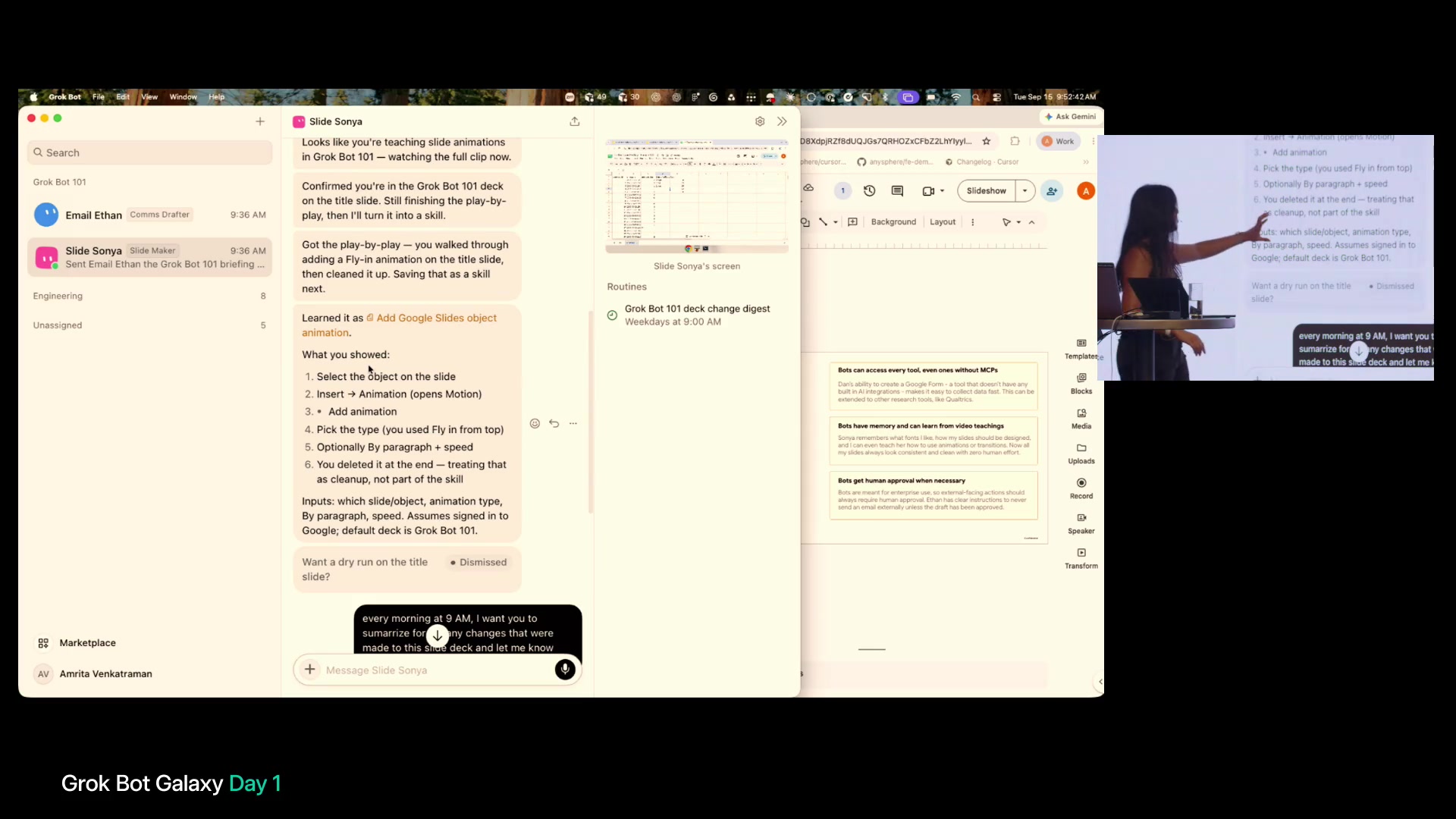
Teach a task
I drove the bot’s mouse once. Now it’s a skill forever.
17:47–18:30
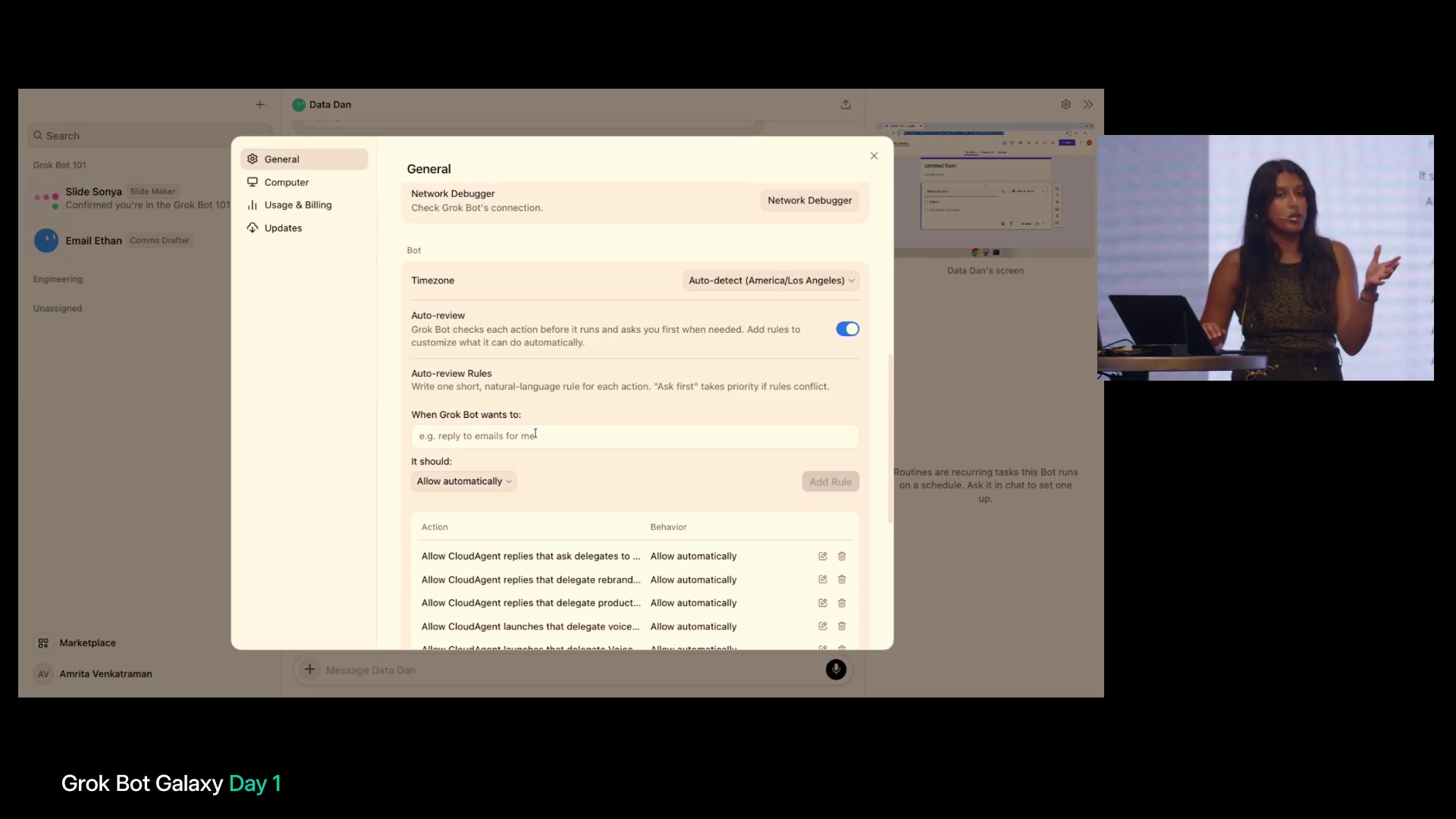
Approval rules
Never reply to email unless you ask me first.
24:57–26:30
Bots message each other
I didn’t chase three tools. Ethan asked Sonya.
31:20–32:55
Marketplace + templates
Publish one brand bot. Whole company stays on-brand.
32:56–33:50
Email draft + Auto-review
Draft in Grok Bot. Send only when you say so.
34:03–35:00
Form → QR → audience
Bot built the form, made the QR, and the room filled it out.
42:42–44:20
Manager pattern
Add a Manager bot. Let it chase blockers—not you.
58:42–01:00:08
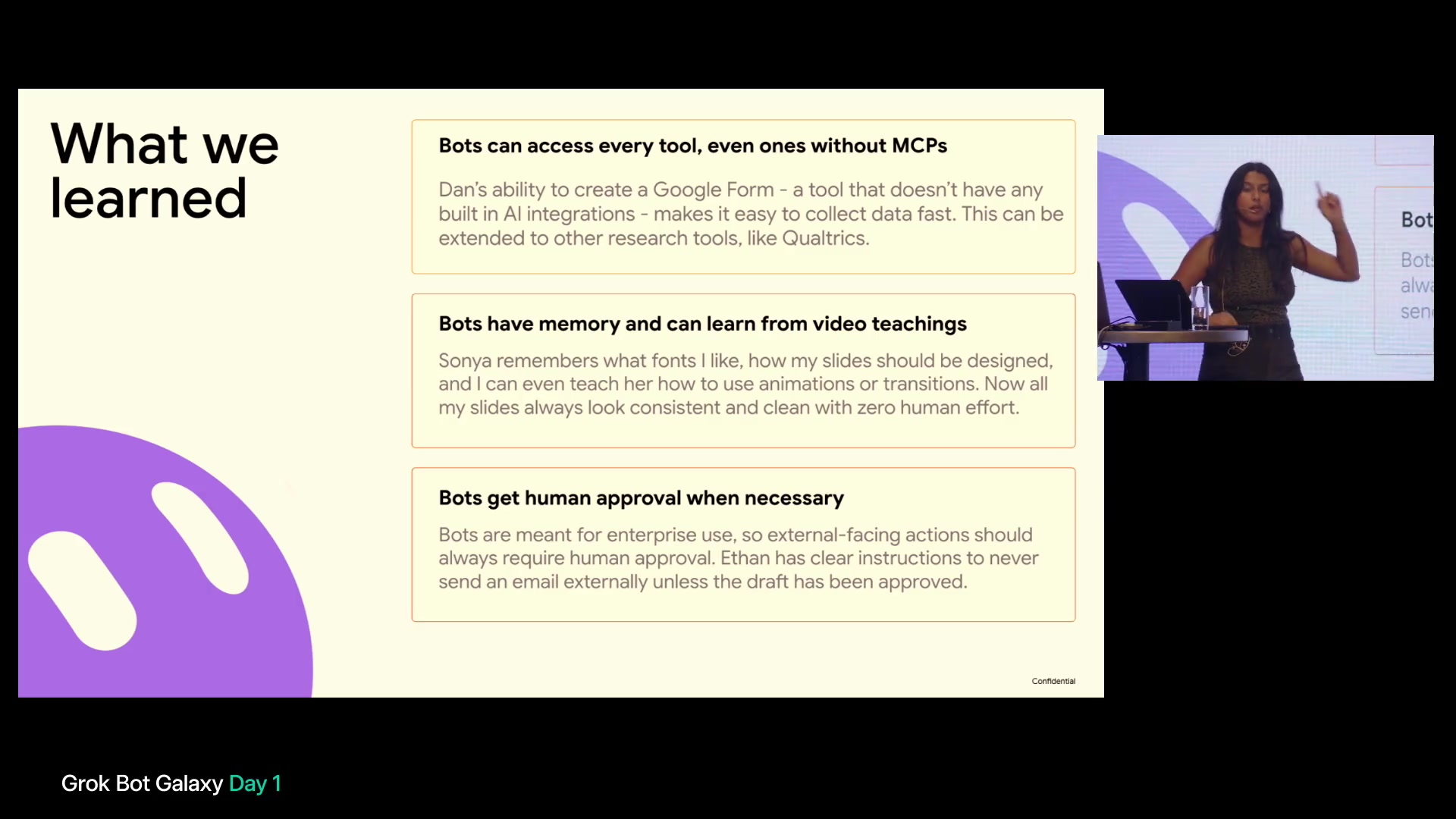
Three learnings
No MCP? Still works. Memory + video teaching. Human approval when it matters.
Tips & tricks
All 75 items from the analysis, grouped for a fast skim.
More
Setup / product model
- 01:11–02:42 — Frame AI eras: chat → copilot → teammate that owns outcomes.
- 02:50–03:40 — Design for messaging teammates: left sidebar = bots with roles/lanes.
- 03:29–03:58 — Create a bot for a unit of work or job responsibility; return to it so it learns.
- 04:03–04:09 — Prefer the teammate paradigm over the task paradigm.
- 04:13–05:13 — Give the bot a computer, not only integrations/MCPs/APIs.
- 05:17–06:06 — Run work in the cloud so it continues when your laptop is closed.
- 06:25–07:14 — Aim for knowledge-work agents that own outcomes.
- 07:29–08:14 — Keep it simple; start easy, then raise ambition until you hit model limits.
- 08:14–08:27 — Treat the bot as an always-on teammate that finishes outcomes.
- 08:32–08:50 — Watch for shared AI colleagues and multiplayer internal tooling.
Teammates / personas
- 09:18–09:28 — The demo pillars are colleagues, an own computer, and memory/learning.
- 10:03–10:36 — Compose a project from specialist bots that hand off work.
- 11:08–11:30 — Name the bot; let the inferred purpose shape its setup options.
- 19:29–19:59 — Put explicit fonts, colors, and “screenshot when done” instructions in its description.
- 20:03–20:05 — Add skills and routines on the bot, not only chat prompts.
- 23:00–23:04 — Have an email bot study past emails to learn tone as a skill.
- 24:32–24:53 — Tell a chief-of-staff bot to always delegate instead of doing the work itself.
- 25:37–26:24 — Keep bots as long-lived personas across many projects.
- 26:28–26:49 — Split the “company” by project or by expertise.
- 30:32–31:15 — Duplicate bots for different stakeholder tones.
- 34:39–35:09 — Use sections/folders to organize many bots.
- 56:20–56:44 — Duplicating copies persona but starts with fresh memory/context.
Computer / tools
- 11:35–11:58 — Offload hated UI work such as Google Forms or Qualtrics to computer use.
- 12:01–12:40 — Use voice mode for speech-to-text now; fuller back-and-forth voice was described as coming.
- 12:53–13:21 — Open Computer to watch the Linux VM work in Forms, Docs, or Slides.
- 13:42–14:02 — Connect built-in MCPs/plugins per task, or ask the bot to set them up.
- 18:40–19:00 — Isolated computers let bots work in parallel without crossing machines.
- 19:02–19:20 — Co-edit the same deck while bot and human work on different slides.
- 21:35–21:45 — Prefer bot-made QR codes for external links and forms.
- 21:45–22:08 — Use the bot computer to open the Sheets, Forms, or responses it created.
- 22:12–22:22 — If it is slow or stuck, take over, finish, then teach it.
- 28:53–29:13 — Expect computer-use speed to improve; it is a major product focus.
- 29:15–29:37 — Lightweight Linux VMs can outsource computer work even on an airplane.
- 49:56–50:54 — For enterprise internals, use VPN and secure credentials to reach Mongo or similar tools.
- 51:25–52:04 — Anything you can do on your machine, the bot can do on its, including screenshots and PDFs.
- 54:36–55:14 — Keep 1Password/API secrets in a secure Grok Bot modal, not plaintext on the VM.
Approvals / safety
- 14:02–14:29 — Expect approval prompts; require permission for external email or Slack.
- 17:47–18:27 — Set granular allow/deny rules: ask before email, auto-create slides.
- 23:51–24:11 — Always ask before replying to email; show the draft first.
- 29:59–30:24 — Auto-review can block replies; Allow once lets you inspect and proceed.
- 46:24–47:46 — Auto-review is a risk classifier; tune it stricter if needed.
- 47:30–47:46 — Auto-review can be over-cautious around PHI/PII; that is normal enterprise posture.
- 48:05–48:37 — After approving copy, tell it not to ask about copy again so memory reduces stops.
- 58:47–01:00:04 — Require human approval for external-facing actions in enterprise use.
Routines / orchestration
- 20:08–20:41 — Run a 9am routine that summarizes slide-deck changes and authors.
- 20:41–21:00 — Use cross-bot routines for a weekly change summary to the boss.
- 24:18–25:36 — Steer by telling one bot to message another for context.
- 27:48–28:26 — Act as manager/overseer; do not micromanage healthy orchestration.
- 35:09–35:36 — Use group chats to see multi-agent chatter in one place.
- 39:03–39:31 — Keep agent swim lanes while sharing context about capabilities.
- 40:50–41:23 — Let agents respect dependencies, such as waiting for a slide before emailing.
- 42:42–44:16 — Add a Manager bot for specialist updates, two-hour blocker checks, and escalation.
Skills / teaching / memory
- 15:01–16:19 — Teach a task by controlling the computer; stop and save the demo as a skill.
- 36:00–36:47 — When it refuses or asks, treat that as a signal to teach or guide it.
- 36:37–36:42 — Memory is persistent; the analysis notes storage in S3.
- 37:43–38:22 — Say what is wrong and validate when troubleshooting is correct.
- 41:41–42:16 — When stuck, state the desired outcome and work backwards.
- 52:39–53:08 — Teach-a-task watches the demo, encodes steps, and saves a reusable skill.
- 55:32–56:18 — Memory is long-lived/editable; update it when deleted bots or old context change.
- 59:21–59:42 — Memory plus video teaching creates a domain-expert persona across projects.
Prompting / habits
- 07:47–08:03 — Ramp difficulty from simple tasks until you find current capability limits.
- 16:31–16:44 — Multitask: switch bots while one works and another learns.
- 57:03–58:01 — Pick the most annoying part of the day and bot it.
- 57:52–58:01 — Give agents personality and ownership of that slice so you get time back.
- 58:20–58:31 — Ask peers how they use Grok Bot; use cases vary by company size.
Collaboration / sharing
- 31:17–32:55 — Share bots as templates; use Marketplace for public or team consistency.
- 32:35–32:44 — Published bots can be updated so others get the latest version.
- 48:45–49:35 — Use @bot in Slack threads for human/bot multiplayer today; in-product group chat was coming soon.
- 53:19–53:51 — Public Marketplace bots work on phone/laptop; internal team Marketplace is separate.
- 53:58–54:23 — A workshop challenge to share a template is a useful nudge to publish.
Gotchas / anti-patterns
- 03:29–03:34 — Do not open a new chat for every task instead of using a durable bot.
- 05:26–05:49 — Avoid local-laptop agents that stop when asleep or cannot be kicked off from a phone.
- 41:56–42:04 — “This isn’t working” without an outcome or detail gives the bot nothing to learn.
- 47:55–48:13 — Constant approval spam often means memory/trust is not tuned yet.
- 55:54–56:15 — If a deleted bot is still remembered, explicitly update instructions and memory.
Orchestration
Data Dan collects. Slide Sonya shapes. Email Ethan sends. A Manager bot watches dependencies and asks for blockers.
Data Dan→Slide Sonya→Email Ethan→Manager
Structure
Roman frames the thesis; Amrita makes it tangible in a live demo and Q&A.
Host · 00:00–01:00 · kickoff
Roman · 01:01–08:54 · chat → copilot → teammate; cloud, computer, memory
Amrita Venkatraman · 08:54–end · bots, forms, skills, approvals, orchestration, Q&A